

Control how big your map is and which on-map controls visitors get. Both live in the Display panel of the builder.
Map size

- Width — a percentage (e.g.
100%to fill its container) or a fixed pixel value. - Height — set in pixels; taller maps suit locators, shorter ones suit a simple “find us”.
Maps are responsive — a percentage width adapts to the column or page-builder cell it sits in.
[wp_map id="12" map_width="100%" map_height="480"]On-map controls
Toggle each control on or off:
- Zoom — the + / − buttons.
- Fullscreen — expand the map to fill the screen.
- Scale — a distance scale bar.
- Geolocate — a “find my location” button.
Scroll-wheel zoom
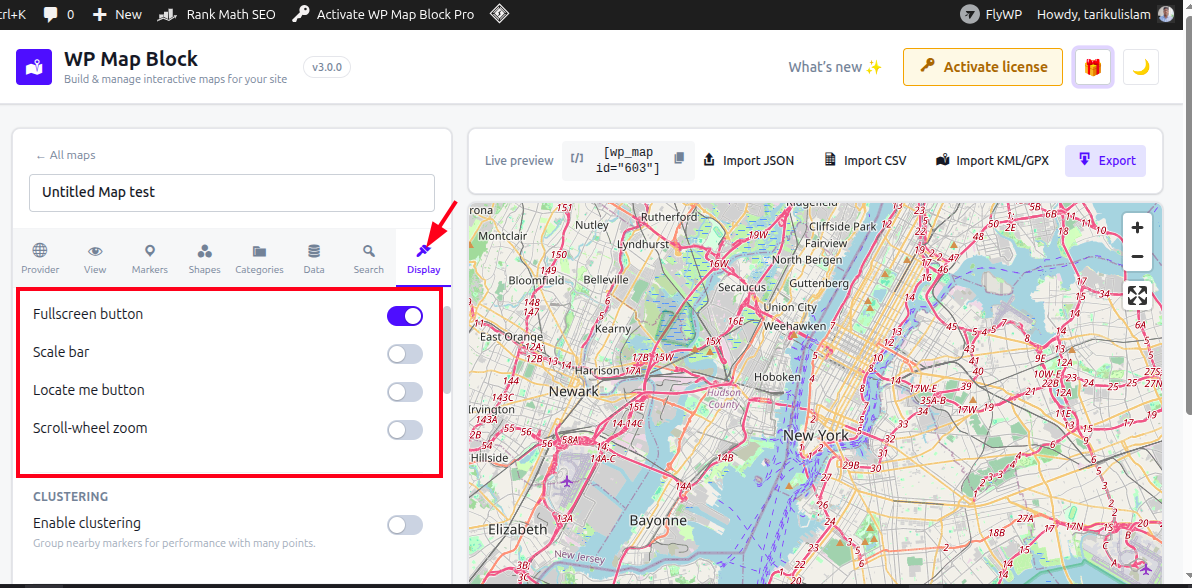
Decide whether scrolling the page zooms the map. Turning it off keeps long pages scrolling smoothly; visitors can still zoom with the + / − buttons.
[wp_map id="12" scroll_wheel_zoom="false"]Tip: for maps embedded mid-article, disable scroll-wheel zoom so readers don’t get “trapped” zooming when they meant to scroll.